

Many dog owners already have an Apple AirTag on their keys. So it is natural to ask: can an AirTag help me find my dog? The short answer is yes, with some important limits. This guide explains how it works, where it works best, and how to use it safely.
How an AirTag finds your dog
An AirTag has no GPS and no SIM card. Instead, it sends a secure Bluetooth signal that nearby Apple devices (iPhones, iPads and Macs) pick up and report to Apple's Find My network. You then see the last reported location in the Find My app on your iPhone.
When you are close by, iPhones with Ultra Wideband support can use Precision Finding, which shows an arrow and distance pointing you straight to the AirTag.
Where it works best
- Cities, towns and suburbs: lots of iPhones nearby means frequent location updates.
- Parks and neighborhoods: usually enough people around to report the location.
- Remote areas, forests and farmland: few or no iPhones nearby, so updates can be slow or stop.
The honest limits
- It is not live GPS. You see the most recent reported location, not a continuous track.
- You need an iPhone. Find My works with Apple devices. Android phones can detect an unknown AirTag nearby but cannot track it.
- Apple designed AirTag for items. Many dog owners use it as an extra safety layer, but it does not replace a microchip, a name tag or a secure fence.
Why AirTag is popular with dog owners
- No monthly subscription: the Find My network is free to use.
- Long battery life: AirTag uses a replaceable coin battery that typically lasts around a year.
- Water resistant: AirTag is rated IP67, so rain and splashes are fine.
- Small and light: suitable for most dog sizes.
How to attach an AirTag to your dog safely
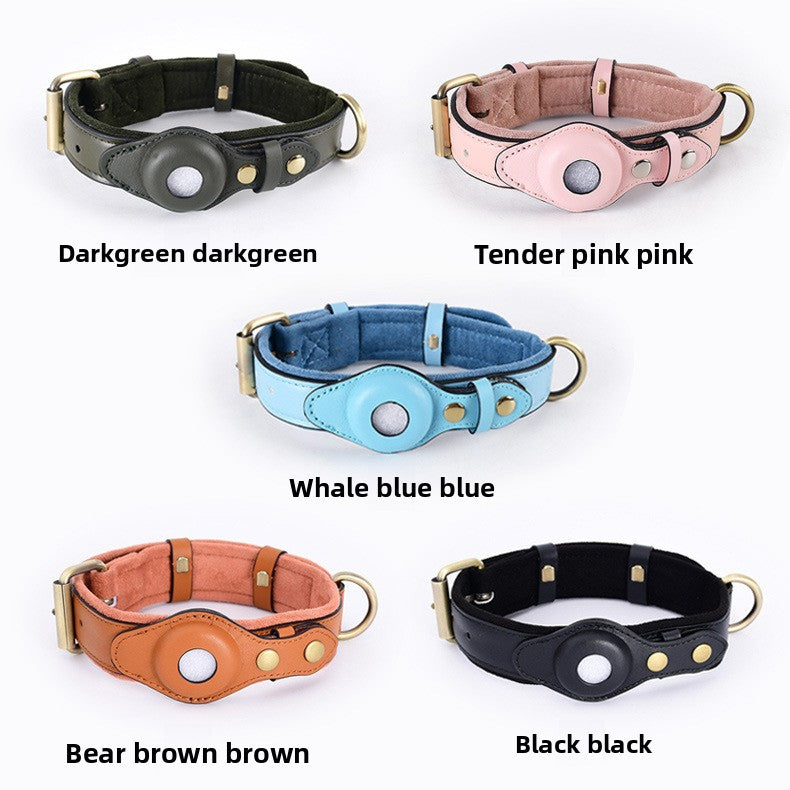
The biggest problem with AirTags on dogs is the holder. Dangling plastic holders swing, catch on things, and can be chewed off. A better option is a collar with a built-in AirTag pocket that keeps the AirTag flat and secure against the collar.
Our AirTag Dog Collar & Leash Set has a dedicated pocket, reflective stitching and a matching leash, and it comes with a free engraved name tag with your dog's name and your phone number. The tag is a simple backup: if someone finds your dog where AirTag updates are slow, they can call you right away.
Quick setup checklist
- Add the AirTag to Find My on your iPhone and give it your dog's name.
- Place it in the collar pocket and check it sits flat.
- Turn on notifications for the AirTag in the Find My app.
- Keep your contact info on an engraved tag and keep your dog's microchip details up to date.
- Check the AirTag battery level every few months.
The bottom line
An AirTag is an affordable, subscription-free way to add location tracking to your dog's collar, especially if you live in a populated area and use an iPhone. Combine it with a secure collar, an engraved ID tag and a microchip for the best chance of bringing your dog home fast.
Share:
How to Help Your Pet Overcome Separation Anxiety Naturally
AirTag vs GPS Dog Tracker: Which Is Right for Your Dog?